Conversational and messaging application · web and mobile

BSE Messenger:
the conversational and messaging application.

Chat with your Google contacts who are on BSE Messenger, or on any BSE web or mobile application. Talk one-to-one, in your BSE Messenger Groups and in your BSE Communities. Type the message yourself, or send a template with call-to-action buttons. Every interested reply stays in your CRM.

Built for businesses that need more interested customers

Manufacturers & traders

Talk with the people you choose, and keep every reply in your CRM.

Retailers & shops

Announce new stock, prices and offers to your customers — and see who is interested.

Service providers

Reach clients with one-to-one messages and templates, and follow up every enquiry.

Marketing teams

Run campaigns to groups and communities, track clicks and assign leads to the team.

How a message is written

Two ways to send

Every message is one of these two. You type it in your own words, or you send a template with call-to-action buttons. There is no third way. BSE Messenger does not send RFQ messages.

1

Type a message

Write the message in your own words and send it as it is. This way has no template and no buttons. You can send that message to one person, in a BSE Messenger Group, or in a BSE Community. A reply is saved in your CRM.

  • Written in your own words, each time you send
  • No template and no call-to-action buttons on this message
  • 1 Ad credit, whether it reaches one person or a whole group or community
  • The first message to a new person waits for their approval
2

Send a template with buttons

Create a template once, add call-to-action buttons, and send it again whenever you need it. Each copy can carry the recipient's name. Start from the specimen template library, or write the template yourself.

  • Specimen template library, or a template you write
  • Buttons: counter-offer, call or message, open a link, interested / not interested — or buttons you name yourself
  • Personalised with each recipient's name
  • 1 Ad credit per send · founding clients on Pro: unlimited until the package expires

Where a message goes

Three places to talk

A typed message and a template can each go to one person, to a BSE Messenger Group, or to a BSE Community. A BSE Messenger Group is not a BSE Business group, and a BSE Community is not a BSE Business community.

1

One-to-one

Talk with one Google contact who is on BSE Messenger, or on any BSE web or mobile application. Send a message you typed, or a template with buttons. The first message to a new person waits for their approval. The reply is saved against that contact in your CRM.

  • One recipient at a time
  • A typed message, or a template with buttons
  • Replies saved against the right contact
2

BSE Messenger Groups

Create a BSE Messenger Group, add the people, and talk there. Send a message you type, or a template with call-to-action buttons. You decide whether members can see the messages. RFQ messages are not sent.

  • Create a group and add people
  • A typed message, or a template with buttons
  • You control whether members see the messages
3

BSE Communities

Create a BSE Community of up to 5,000 members. Send a message you type, or a template with call-to-action buttons. You decide whether members can post. RFQ messages are not sent.

  • Up to 5,000 members per community
  • Members join by your invite link, by request, by open join — or you add them
  • You decide who can post

How it works

1

Build your audience

Start from your Google contacts. You can message the people who are on BSE Messenger or on any BSE web or mobile application. You can also import from Excel / CSV or add a contact by hand.

2

Post or write your message

Type the message in your own words, or create a template with call-to-action buttons. BSE Messenger does not send RFQ messages.

3

Send to the right people

Pick contacts by tags, send one to one, or share in your groups and communities. The first message waits for the recipient's approval.

4

Capture interest

Recipients respond with a button — interested, a counter-offer, a call or your own custom action — and every response lands in your CRM.

5

Nurture your leads

Set a status, add notes, schedule follow-ups and assign each lead to a team member — then watch conversions in your reports.

Bring your whole audience — five ways

Excel / CSV import Phone contacts Email contacts sync Manual entry Businesses already on BSE Messenger

Contacts who are not on BSE Messenger yet are marked "not on app", so you can invite them.

BSE Messenger

What is BSE Messenger?

BSE Messenger is a conversational and messaging application by Business Solutions Ecosystem, on the web and on mobile. You chat one-to-one, in BSE Messenger Groups and in BSE Communities, with your Google contacts who are on BSE Messenger or on any BSE web or mobile application. You send in two ways: type the message yourself, or create a template with call-to-action buttons.

BSE Messenger is not integrated with any other web application or third-party tool, and it serves its own users. The web and mobile applications of Business Solutions Ecosystem are integrated with each other, so the same person signs in with the same credentials. A feature that belongs to another application needs that application's own package. Messages stay inside BSE Messenger, with a notification, and the first message from a new sender waits for the recipient's approval.

BSE Messenger does not send RFQ messages. A reply is saved in your CRM against the right message and the right contact, ready for your team to follow up.

Step by step

Create and send template messages with buttons

Everything is in the BSE Messenger web and mobile apps. Build your message once, then send it one to one, in BSE Messenger Groups and in BSE Communities — free within your monthly Ad credits.
Preview message
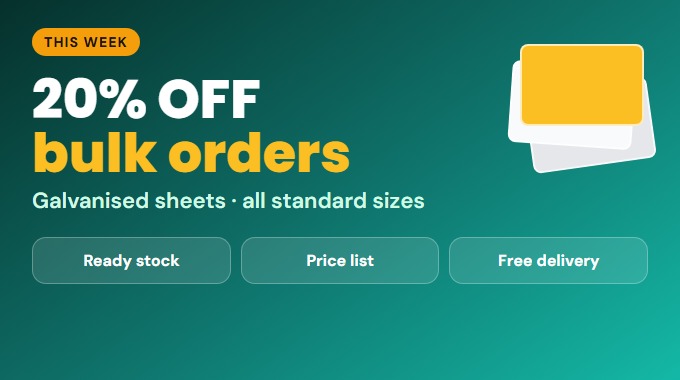
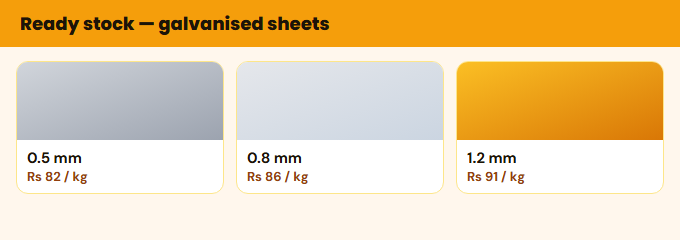
Offer image sent with the marketing message: 20% off bulk orders on galvanised sheets Product image sent with the marketing message: ready stock and prices

Smart buyers check the offer first.

Need sheets for your next order? This week’s stock and prices are ready.

Ready stock — galvanised sheets, all standard sizes

This week’s price list

Free delivery on orders above ₹50,000

yourbusiness.in/offer

yourbusiness.in/prices

See the sizes and rates, then send your requirement.

Order this week.
— Your business

11:50 PM
View this week’s offer Reply
Specimen

Send an image with your marketing message

A marketing message is allowed to carry an image, and most businesses should. Upload a product photo, an offer poster or a catalogue page. It sits at the top of the message, full width, exactly as the two images do in this specimen. The customer sees what you sell before reading a word.

One message can carry more than one image, and a video or a PDF as well. Add them once under Add/Upload Media, then attach them when you write the message. Your text, links and call-to-action buttons follow the image. When the customer taps a button, that response is saved in your CRM.

Then the offer reaches your team

The client’s reply is received in your CRM as an offer. Before anyone on your team calls, a thank-you message goes to the client automatically, so they stay engaged until your team contacts them. You then deploy your team to nurture that qualified lead.

1

The offer is received in your CRM

The reply, with the client’s details, is saved and ready for your team.

2

A thank-you goes out automatically

Sent for engagement, and it holds the client until your team makes contact.

3

Your team nurtures the qualified lead

Assign it, follow up, and work the lead through to a sale.

1

Create your message library

In the app menu: Create Media Database for Template and Button Messages

Set it up once and reuse it in every campaign.

  1. Add a heading Add Heading of Marketing Message Name the offer or campaign the message is about.
  2. Upload media Add/ Upload Media Images, videos or PDFs — product photos, catalogues, price lists, brochures.
  3. Write the message and add buttons Add Marketing Message Your text, media and call-to-action buttons in one template.
  4. Review your messages View Marketing Message See, edit and reuse every template you have made.
2

Advanced marketing: send templates

In the app menu: Advance Marketing

Template messages with buttons — every response is saved in your CRM.

  1. To mapped groups, by label Send Template Messages in Mapped Groups With Labels Reach every BSE Messenger Group mapped to the labels you pick.
  2. To groups you choose Send Template Message to Manually Selected BSE Messenger Groups Pick groups one by one — including groups you are a member of, where posting is allowed.
  3. One to one, by label Send Template Message to Master Labels Every contact in your master labels gets the message personally.
3

Basic bulk marketing: send custom messages

In the app menu: Basic Bulk Marketing

Quick text updates, one to one and in groups, without a template.

  1. To mapped groups, by label Send Manual Message to Mapped Groups With Labels One update to all BSE Messenger Groups mapped to your labels.
  2. To groups you choose Send Custom Message to BSE Messenger Groups Select the groups by hand.
  3. One to one Send Custom Message to One to One Contacts A personal custom message to each contact in your labels — no template, no buttons.
  4. To pasted numbers Send BSE Messenger Message Manually Pasted Numbers Paste mobile numbers — no label or template needed.

Free plan: 1,000 Ad credits every month — 1 per one-to-one message, and 1 per BSE Messenger Group or Community message. Founding clients who buy Pro by 31 December 2026 get unlimited messages until that package expires.

Use template messages when you want buttons and responses in your CRM; use custom messages for quick updates.

Enrol free and create your first template

Sending to everyone isn't marketing. It's noise.

The old wayOne big group — your requirement competes with greetings, forwards and forty unrelated posts.
The BSE Messenger wayYour own BSE Messenger Groups and BSE Communities — a message about biomass pellets reaches only the people you mapped as biomass pellets buyers / biomass pellets sellers.

A CRM for every interested lead — and your whole team

BSE Messenger captures interest. Here, an interested user is a qualified lead — and your team takes it from there.

Lead status

Every response becomes a lead with a status, from new to won or lost.

Notes & history

Notes and the full message history for each contact, in one place.

Follow-up reminders

Never miss a follow-up — set a reminder on any lead.

Assign to your team

Assign each lead to a team member for nurturing.

Roles & permissions

Add team members and decide what each role can see and do.

Team performance

See leads and conversions for each team member.

Know what works

Message reach

Sent, delivered and opened, for every message.

Button clicks

Clicks on every call-to-action button.

Leads & conversions

Leads captured, by status — and how many you won.

Group & community growth

Members who joined, left or muted over time.

Why business owners choose BSE Messenger

Web and Android app

Use BSE Messenger on the web and on Android. Enrol free, then install the Android app from inside your account.

Free for life

Every user gets 1,000 Ad credits on the 1st of each month, with all features — free, for life.

Unlimited for founding clients

Enrol a Pro plan by 31 December 2026 and there is no cap on messages until that package expires. Clients who upgrade after that date will be on tier-based plans.

Call-to-action buttons

Every template carries buttons and links, so the next step for the reader is always one tap away.

Right to reshare

Send the same typed message or template again to your mapped contacts whenever you need.

Approval and mute

Messages go only to people who approved them, and viewers can mute notifications anytime — respecting everyone's privacy.

Responses saved in a CRM

Every response is captured against the right message and contact — nothing is lost in a chat thread.

Custom buttons

Use ready buttons — counter-offer, call, link, interested — or create your own call to action.

Segmented awareness campaigns

Pick your business type — manufacturer, trader, wholesaler & retailer or service provider — and the campaign fields change to match how that segment buys and sells: raw material and volumes for manufacturers, buy/sell and price validity for traders, reorder frequency and minimum order for wholesalers, service category and coverage area for service providers.

Included free · Every plan

Your free business catalogue — your shop window in every message

Every BSE Messenger account comes with a ready business catalogue. Add your products and services once, and your template messages and call-to-action buttons can show them — so interested customers see what you sell and respond on the spot.

Enrol free and build your catalogue Free on every plan · No card needed

Given free as part of our Digital India 360 mission to bring every business online.

Why we built BSE Messenger

Interested leads, with their details

Our aim is to give MSMEs and business owners interested leads and their details — for the world, starting from India.

Digital daily operations

Digitalise the everyday working of business owners — marketing, follow-ups and selling, day after day.

Free for life, Pro when you grow

A Free plan with 1,000 Ad credits every month, and unlimited messages for founding clients who buy Pro by 31 December 2026, until that package expires.

B2B and B2C

Equally useful for businesses that sell to other businesses and for those that sell to consumers.

BSE Messenger vs typical template-messaging services

Feature Typical template-messaging services BSE Messenger
Cost per template message Around ₹0.80 per message 1,000 Ad credits free every month · founding-client Pro: unlimited until the package expires
Sending limit Pay per use, often in tiers Free plan: 1,000 Ad credits a month · founding-client Pro: unlimited until the package expires
Call-to-action buttons Yes Yes — including your own custom buttons
Specimen template library Varies Yes
Requirement or offer converted into a template automatically No Yes
Messages personalised with the recipient's name Varies Yes
Groups and product-specific communities No Yes — up to 5,000 members per community
Lead CRM with status, reminders and team assignment Usually a separate tool Yes, built in
Reports on reach, clicks and conversions Varies Yes
Recipient approval, mute and block Varies Built in

What per-message charges add up to

An illustration at the typical rate of ₹0.80 per template message:

Messages per month At ₹0.80 per message — monthly Per year With BSE Messenger
1,000 ₹800 ₹9,600 Free plan (1,000 Ad credits)
10,000 ₹8,000 ₹96,000 Founding-client Pro — unlimited until expiry
50,000 ₹40,000 ₹4,80,000 Founding-client Pro — unlimited until expiry

Illustrative figures only, at a typical market rate. BSE Messenger has no per-message fee: the Free plan includes 1,000 Ad credits every month, and founding clients who buy Pro by 31 December 2026 get unlimited messages until that package expires.

Built on permission and privacy

Reaching more people should never mean disturbing them. The first message from a new sender waits for the recipient's approval, and every recipient can mute or block a sender at any time.

This approval mechanism protects both sides: your audience stays in control of what they receive, and your messages reach people who want to hear from you.

We respect every user's privacy. Your contact lists and the responses you receive belong to you — they are used only to deliver the service to you.

Available today — and coming next

Feature Status
Free plan — 1,000 Ad credits every month, for life Available
Template marketing messages with call-to-action buttons Available
Specimen template library and custom buttons Available
Typed messages and template messages, personalised with the recipient's name Available
One-to-one messages, with approval of the first message Available
BSE Messenger Groups — typed messages, templates and control over what members see Available
BSE Communities of up to 5,000 members Available
Lead CRM — status, notes, reminders, team assignment Available
Teams — roles, permissions and performance view Available
Reports — reach, clicks, leads and conversions, growth Available
Free business catalogue with a public link Available
Web app, and the Android app inside your account Available
Drip campaigns Coming next
Chatbot Coming next
AI auto-reply Coming next
Social media business page posting Coming next

Why we built it this way

"We believe business applications should be built to solve the business problems of business owners — organically, from their own data and their own relationships. BSE Messenger is our step in that direction: support for business owners, in the true sense, in saving both time and money."

Free plan

Ad credits: 1,000 free every month

Every user gets 1,000 Ad credits on the 1st of each month — for a message you type and for a template message.

1 Ad credit

One-to-one message

Each message to one person in your audience.

1 Ad credit

Group or community message

Each message shared in a BSE Messenger Group or Community — however many members it has.

Example: 1,000 Ad credits = 1,000 messages, whether each one is one-to-one, in a BSE Messenger Group, or in a BSE Community.

Pre-launch offer

Join before 31 December 2026 — save up to 63% on Pro.

A flat discount on every Pro plan for businesses that buy by 31 December 2026, 11:59 pm IST.

40% off

1 Month

₹2,400/mo

₹2,400 for 1 Month

Regular price ₹4,000

50% off

6 Months

₹1,875/mo

₹11,250 for 6 Months

Regular price ₹22,500

60% off

1 Year

₹1,400/mo

₹16,800 for 1 Year

Regular price ₹42,000

63% off

2 Years

₹1,200/mo

₹28,800 for 2 Years

Regular price ₹78,000

Offer ends in

--Days
--Hours
--Minutes
--Seconds

The discount applies to Pro plans bought before the offer ends. Start on the Free plan first — all features included.

Unlimited messages are a limited-time offer, and only for founding clients. Enrol on a Pro plan by 31 December 2026, 11:59 pm IST, and unlimited messages last until that Pro package expires. Clients who upgrade after 31 December 2026 will be on tier-based plans.

Pricing

Free for life. Pro when you grow.

Every user gets the Free plan — all features and 1,000 Ad credits every month. Unlimited messages on Pro are for founding clients who enrol by 31 December 2026, until that package expires.

Free

₹0 for life

  • Both ways to send and all three places to talk, plus CRM, teams, reports and catalogue
  • 1,000 Ad credits every month
  • 1 credit per message — one-to-one, group or community
Enrol free

1 Month

Pro — unlimited messages for founding clients

40% off · Pre-launch offer

₹2,400/mo ₹4,000

Billed monthly

Regular price ₹4,000 · you save ₹1,600

Offer price valid till 31 December 2026, 11:59 pm IST

Choose 1 Month

6 Months

Pro — unlimited messages for founding clients

50% off · Pre-launch offer

₹1,875/mo ₹3,750

₹11,250 for 6 Months

Regular price ₹22,500 · you save ₹11,250

Offer price valid till 31 December 2026, 11:59 pm IST

Choose 6 Months

2 Years

Pro — unlimited messages for founding clients

63% off · Pre-launch offer

₹1,200/mo ₹3,250

₹28,800 for 2 Years

Regular price ₹78,000 · you save ₹49,200

Offer price valid till 31 December 2026, 11:59 pm IST

Choose 2 Years

Unlimited messages are a limited-time offer, and only for founding clients. Enrol on a Pro plan by 31 December 2026, 11:59 pm IST, and unlimited messages last until that Pro package expires. Clients who upgrade after 31 December 2026 will be on tier-based plans.

Every Pro plan includes both ways to send and all three places to talk · Prices exclude GST · Refunds

Enrol free

Questions about BSE Messenger

What is BSE Messenger?

A conversational and messaging application by Business Solutions Ecosystem, on the web and on mobile. You chat one-to-one, in BSE Messenger Groups and in BSE Communities, with your Google contacts who are on BSE Messenger or on any BSE web or mobile application. You type a message, or you send a template with call-to-action buttons. It does not send RFQ messages. Replies stay in your CRM.

Who is it for?

B2B and B2C businesses alike — manufacturers and traders, retailers and shops, service providers and marketing teams.

Is BSE Messenger connected to other tools?

No. It is not integrated with any other web application or third-party tool, and it serves its own users. The web and mobile applications of Business Solutions Ecosystem share one sign-in. A feature in another application needs that application's own package. BSE Messenger does not send RFQ messages. You type a message, or you send a template with call-to-action buttons, one-to-one, in a BSE Messenger Group, or in a BSE Community.

How do my messages reach people?

Inside the BSE Messenger app, with a notification. The first message from a new sender waits for the recipient's approval; after that your messages flow, and recipients can mute or block a sender at any time.

What if a contact is not on BSE Messenger?

They are marked "not on app" in your list, so you can invite them to join.

View more questionsView fewer questions
How do I build my audience?

Import from Excel / CSV, your phone contacts or email contacts sync, add contacts by hand, or find businesses already on BSE Messenger.

Who writes the templates?

You type the message yourself, or you create a template with call-to-action buttons. You can also start from the specimen template library. BSE Messenger does not turn an RFQ into a message.

What can the buttons do?

Send a counter-offer or quote, call or message you, open a link, or mark "interested / not interested" — and you can create your own custom buttons.

What does a "qualified lead" mean in BSE Messenger?

BSE Messenger is a marketing tool that captures interest. A qualified lead here is a person who has shown interest — ready for you and your team to nurture.

Are messages personalised?

Yes. Requirements and offers shared with your tagged contacts reach each person with their name on them.

What are BSE Messenger Groups and BSE Communities?

BSE Messenger Groups are groups you create for the conversation. BSE Communities are larger audiences, up to 5,000 members, for a typed message or a template with call-to-action buttons. Neither is used to send an RFQ.

Can I send an RFQ from BSE Messenger?

No. BSE Messenger does not send RFQ messages. You type a message, or you send a template with call-to-action buttons, one-to-one, in a BSE Messenger Group, or in a BSE Community.

Can I control what group members see?

Yes. You decide whether the members of a group can see the messages posted in it.

How do people join my community?

Four ways: you add them, they join with your invite link, they find it and request to join (you approve), or — for public communities — they join instantly.

Can community members post?

You decide, community by community, whether members can post.

What does the CRM do?

Every response becomes a lead with a status. Add notes, see the full history, set follow-up reminders and assign leads to your team.

Can my team work on the leads?

Yes. Add team members, set roles and permissions, assign leads and see each member's performance.

What reports do I get?

Message reach (sent, delivered, opened), button clicks, leads and conversions, and group and community growth.

What is the free business catalogue?

A free catalogue for every business — profile, products and services, a public link, and the option to show it in your messages and buttons — as part of the Digital India movement.

Is BSE Messenger free?

Yes. The Free plan is free for life, with all features and 1,000 Ad credits every month. Founding clients who buy Pro by 31 December 2026 get unlimited messages until that package expires.

How much does it cost?

The Free plan costs nothing. Pro plans are one flat subscription — choose by duration in the Pricing section. Unlimited messages are for founding clients who buy by 31 December 2026, until that package expires.

Are there limits on messages, groups or communities?

On the Free plan you get 1,000 Ad credits a month: 1 credit per one-to-one message, and 1 credit per message shared in a BSE Messenger Group or BSE Community, however many members it reaches. Founding clients who buy Pro by 31 December 2026 get unlimited messages until that package expires. Each community can have up to 5,000 members.

Are template messages free?

Yes. On the Free plan they use your 1,000 monthly Ad credits. Founding clients who buy Pro by 31 December 2026 get unlimited messages until that package expires.

How do I get the mobile app?

Enrol on the free plan. BSE Messenger runs on the web and on Android. Install the Android app from inside your account.

Which languages does the app support?

English and Hindi.

What is coming next?

Drip campaigns, a chatbot, AI auto-reply from your instructions, and social media business page posting — in upcoming phases.

Who owns my data?

You do. Your contact lists and the responses you receive belong to you, and are used only to deliver the service to you.

How do I get help?

Call or message +91-98146-27080, 365 days a year, 9:30 am – 6:45 pm, or email support@bsebusiness.com.

Is there a pre-launch offer?

Yes. Businesses that buy a Pro plan by 31 December 2026, 11:59 pm IST get 63% off the 2-year plan, 60% off the 1-year plan, 50% off the 6-month plan and 40% off the monthly plan.

What are Ad credits?

Credits that measure messages on the Free plan: 1 Ad credit for each one-to-one message, and 1 Ad credit for each message shared in a BSE Messenger Group or Community, whatever its size.

When do Ad credits reset?

On the 1st of every month you get a fresh 1,000 Ad credits. Unused credits do not carry over.

What happens when my Ad credits run out?

Everything else keeps working. Founding clients who buy a Pro plan by 31 December 2026 get unlimited messages until that package expires.

Who gets unlimited messages?

Founding clients only, and only for a limited time. Enrol on a Pro plan by 31 December 2026, 11:59 pm IST, and unlimited messages last until that Pro package expires. Clients who upgrade after 31 December 2026 will be on tier-based plans.

See all questions, by topic

Our mission · Digital India 360

Why we do this: digitalising the way India does business

BSE Messenger is the first step of Digital India 360 (digitalindia360.com) — our programme to help MSMEs and business owners run their whole business digitally, not just their marketing.

Digitalisation, not just digital marketing

Ads bring clicks; digitalisation brings control. Digital India 360 looks at the whole business — operations, procurement, sales, CRM, processes and decisions.

Growth from your own data

Grow organically from your own contacts and customers. Your contacts and leads stay in your account, for your team to use.

Remove the bottlenecks to growth

One flat subscription instead of per-message bills, and everyday tools that save business owners time and money.

Built with business owners in mind

Founded by a procurement consultant with more than two decades of practical experience with large industries — built for the everyday reality of MSMEs.

Our goal: Serve 1 million MSMEs Starting in India, for the world

Take the first step today — it is free.

Enrol free

Use the application on the web and on Android.

The conversational and messaging application runs in the browser and on Android.

1

Enrol on the free plan

Create your account on the web. No card. You get every feature, for life, with 1,000 Ad credits on the 1st of each month.

Enrol free
2

Download the mobile application

BSE Messenger is on Android as well as the web. Enrol, then open it on the web or install the Android app from inside your account.

Open your account

The Android app is inside your account after you enrol.

Start capturing interested leads today.

Enrol free — all features, 1,000 Ad credits every month — then download the Android app.